|
What We’re Working On
|
 |
 |
|
 |
 |
You may or may not have noticed a few of the changes made recently to TurboSquid. We’ve been busy fixing issues as well as moving the needle on some big projects. Here’s a breakdown of what we’ve been working on.
Translations: In December, we announced the movement toward translating all of TurboSquid into 10 languages. What started with a few select site pages has expanded to include Full Preview and the Navigation Bar. This feature is still only available for artists and, as always, we welcome your feedback.
Seeing Double: For those artists that have experienced products being published multiple times, we’ve taken care of that. Within the publisher, we have disabled the “publish” button from displaying after an item has been submitted. This should eliminate the ability to create multiple products by clicking the publish button more than once for an already submitted asset.
Time Saving Tools: We are working on time-saving tools that will help to speed up your support requests. This isn’t out just yet, but we hope to make it available soon. As always, we are committed to working on ways to improve your TurboSquid experience.
Our Squids are always working on something exciting, so be sure to check our forums for updates on other projects and site issues.
|

 |
|
|
 |

|
|
 |
|
|
 |
|
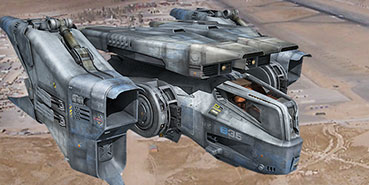
This month’s featured model of a Sci-Fi Fighter is out of this world, thanks to TS artist GrafxBox. Hailing from the picturesque Spanish coast, Grafxbox talks to us about what inspires him, from earthly nature to science fiction.

Think your CheckMate Pro model has what it takes to be the next Featured Model on our home page? Click here for details.
|
|
|
 |
 |
 |
 |
Do You Like OpenCollada?
Pro Tip From Our 3D Experts
|
|
 |
|
|
 |
|
TurboSquid Support Supervisor, Chris Johns, shares a tip to maximize your model’s compatibility with multiple applications and ultimately attract more buyers.
According to Chris, “The OpenCollada (*.dae) file type is one of the most reliable exchange formats available. When providing conversions for our customers, we typically will go with the OpenCollada (*.dae) file. Most applications can use OpenCollada (*.dae) files without any additional plugins.”
“A tip for a good export is to look for any errors when exporting and resolve them. This will help ensure that everything is transferred with the exchange format. Visit this site for the 3ds Max and Maya installers.”
|
|
|
|
 |
& |
 |
|
|
 |
|
|
 |
|
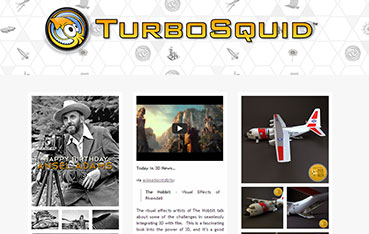
Introducing the new TurboSquid Tumblr! Connect with us for Inspector Picks, more 3D news, and a heavy dose of trivia. Check us out at turbosquidinc.tumblr.com. If there’s a model you’d like to show us from your own Tumblr, tag it with “TS Artists”!
|
|
|
|
& |
|
|
|
 |
This entry was posted
on Friday, March 8th, 2013 at 11:55 am and is filed under Artist Newsletter.
You can follow any responses to this entry through the RSS 2.0 feed.
Both comments and pings are currently closed.